Remove the parts from the foam sheets gently with an X-Acto blade around the edges where they are attached
to the sheets and place them on a flat building surface. When you separate the wing pieces, keep the wings
and ailerons together as pairs.
|
Bevel both pieces of all the hinge joints. Lay the stabilizer top side down (important for painted kits) with
the hinge edge slightly back from the edge of the work surface or table. You want to cut the foam to a point
but not remove any of the top paint surface. Place a cork backed metal ruler on top of the stabilizer the same
distance from the edge as the thickness of the foam. Using a new X-Acto blade or snap knife, trim along the
edge/ruler at a 45 degree angle the length of the edge. If the foam starts to drag and rip, change to a new
blade. Cut the elevator in the same manner.
|

|
Continue cutting bevels in the aileron and wing control surfaces being careful to make left and right ailerons
and the matching surface on the wings. Again, lay the top painted surface on the table through this process. Do
not cut the bevels in the fuselage or rudder at this time.
|

|
Our preferred method of hinging is glue hinges and that is what we will reference in these instructions. Feel
free to substitute your favorite method but you might want to do a test hinge with some of the EPP scraps in
the kit to see the benefits. Check out this YouTube video to see how easy it is to make the glue hinge.
http://www.youtube.com/watch?v=q0uK8KlR-0I Holding the
two pieces to be hinged together with the top paint inward, smear a thin coating of Foam-Tac/UHU/Welders glue on
the points of the bevels you have just cut. Start with the elevator and stabilizer. The hinge is best when just
a fine coating of glue is used and the glue overlaps the point of the bevel about 1/8" on either side. With the
stab and elevator coated, let them dry to the touch. Place the stab and elevator on the building surface with
the hinge bevel points on the top (top paint up) and slide the two pieces into contact. "Squish" them together
gently, but firmly. Flex the hinge to make sure it moves freely. This joint will strengthen overnight. Continue
with the hinging of the ailerons.
|

|
Once all the elevator and ailerons have been hinged, it is time to do the main assembly. Working in an area large
enough that the entire outline of the plane can lay flat, take the two wing panels and test fit them making note of
the surfaces that make contact and spread the contact glue on both sides thinly and let it dry. Slide the wings
together top side towards the table and press firmly together on the flat surface so they align and attach.
|

|
Spread Foam-Tac glue on the carbon fiber strip; insert it into the wing slot.
With an X-Acto knife, remove the webs in the elevator spar slot. Spreading Foam-Tac glue on the medium carbon fiber,
insert it into the elevator slot.
Locate the horizontal front (motor mount area) of the fuselage and fit it to the front of the wing. Spread contact
glue on both edges that come in contact and press in place.
|
Optional: There is a small piece of flat carbon strip in the kit which can be optionally be used to further
reinforce the nose of the plane. Just cut the carbon in half and cut slices into the nose area as shown and using
Foam-Tac glue insert it in place as shown.
|

|
Attach the rear horizontal fuselage piece to the rear of the wing in the same manner.
Take the stab/elevator assembly and making note of the wing hinge line (we consider the side with the smooth joint
the top and the side with the bevel to be the bottom), attach it to the rear fuselage piece in the same way with
the hinge facing the same side as the wing (both up or both down).
|
You should now have an outline of the completed plane. This is a good place to paint the plane before you attach the
fuselage pieces if you purchased an unpainted kit.
|

|
Once your paint is dry, remove the fuselage halves from the foam sheet and bevel the rudder hinge joint. Check the
elevator horn slot position and you want the point of the rudder hinge bevel on the side opposite the elevator horn
slot. This allows for your rudder horn and servo to be on the side opposite the elevator servo. Make sure that you
bevel the same sides of the rear fuselage and rudder. Do not hinge the rudder at this time.
|
Place the plane outline subassembly with the smooth hinge joint/top paint surface down on the building surface so the
V bevel is facing up. Find the fuselage bottom and test fit it into the notches on the outline. Smear glue on the two
pieces and attach the fuselage bottom in place making sure it stands perpendicular to the horizontal surface and the
motor mount notch faces forward.
|

|
Find the two thin (3mm) wedge shaped EPP tail stiffeners. These are glued to the bottom of the fuselage at a 45 degree
angle to form a triangle cross-section with the fuselage bottom and horizontal outline and even with the rear fuselage
bevel. This will prevent the tail from twisting in flight, so it is important to complete this step flat on the building
board to maintain the alignment. There are small alignment holes and slightly larger ones paired in the rear of the wing
and rear horizontal tail. You can put round toothpicks into the smaller holes to help align where the edges of the tail
stiffeners should go. The ends of the stiffeners should position between the larger holes. The large end of the wedge
should face the front/wing end. Dry fit the wedge in place so you have an idea of where the glue should be spread and
attach one of the thin wedge shaped pieces to each side of the rear fuselage. This is a good place to take a break and
let all the glue strengthen.
|


|
Take the plywood aileron servo bellcrank (bowtie shaped) and glue it to the existing nylon servo arm using CA. Rough the
surface of the nylon servo arm with sandpaper first. Position/align the center hole of the plywood bellcrank concentric
with the screw hole in the nylon servo arm. If you are using the 9 gram HXT900 servo included in our completer kit
you will find alignment holes in the bellcrank that either the .032" z-bend rods or #1 screws can be used to align the
bellcrank for gluing. We have cut the center hole to be snug on the servo arm and attach under the arm.
|


|
With the aileron servo bellcrank mounted as shown, install the 9 gram aileron servo in the precut hole in the
front of the plane. Note that the servo output shaft is towards the rear and the flat side of the bellcrank is also. Tack
glue the servo in place with your preferred method, I use Foam-Tac glue on the mounting ears but other people use low
temperature hot glue.
|

|
Glue the fuselage top onto the plane, aligning it with the slots. Cut the servo hole out if necessary to allow clearance
over the servo arm. Glue with contact glue.
|

|
Take your motor and mount it to the plywood disk provided being careful not to block the notches. Set it so the wires
aren't in the notches either. Remove the motor and using CA glue, glue the disk onto the front of the plane built
thus far. If you are using the HexTronics 2730 motor from our completer kit the firewall has pilot holes to match the
mount.
|

|
Using Foam-Tac, glue the small foam quarter circles (gussets) to the back of the motor disk so the curvature matches
the motor mount and the fuselage to provide more contact surface to secure the motor disk. Two sets of gussets are
provided for additional glue area.
|

|
Glue the 3mm fuselage doublers to the underside of the nose of the fuselage to further reinforce this area to protect
it during landings.
|

|
The elevator horn has a notch in it to step over the elevator spar and is different than the other horns. Install it
in the top of the elevator. Glue it in place with Foam-Tac glue along the entire length. Insert the aileron control
horns into the precut slots in the top of the ailerons so they are flush with the bottom of the aileron slot and the
holes are aligned over the hinge line. These longer horns provide support to the control surfaces.
|

|
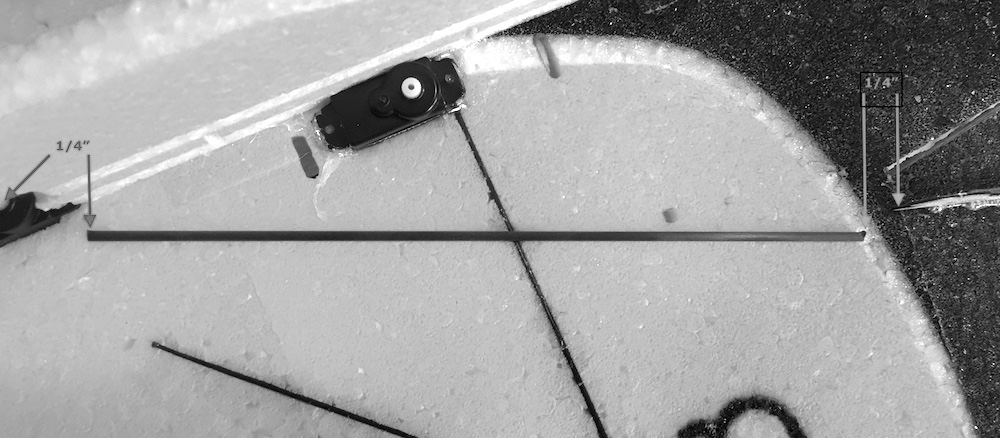
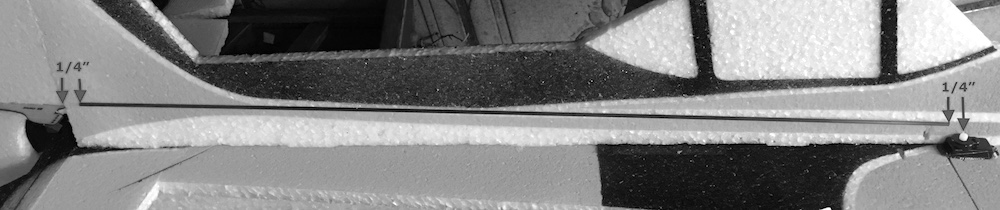
Measure the carbon fiber pushrods to be 1/2" smaller than the distance from
the servo arm screw to the surface hinge line at the control horn as shown in the pictures.
|
|
Attach the Z-bend wires to each end of the carbon fiber pushrods using the
small pieces of heatshrink tubing. Note that for the tail pushrods, be sure to slip the pushrod guides/stand
offs on the rods before doing the second end. ***DO NOT GLUE AT THIS TIME***
|

|
Install the pushrods into the aileron horns and then with the bellcrank loose, insert the adjustable ends into the
outer hole, second from the front lobes. Pop the bellcrank back onto the servo and center it and adjust the ailerons
so they are level. The rods/z-bends will slip under the heat shrink tubing to allow this adjustment but also hold it
in place for gluing. With paper towel or plastic under the pushrods to avoid marring the paint, glue the wires to the
carbon fiber rods with CA to hold this position.
|

|
Hinge the rudder to the rear of the fuselage using a Foam-Tac hinge as done on the other control surfaces.
|

|
Glue the rudder horn in place so that it is on the side of the fuselage opposite the elevator horn.
|

|
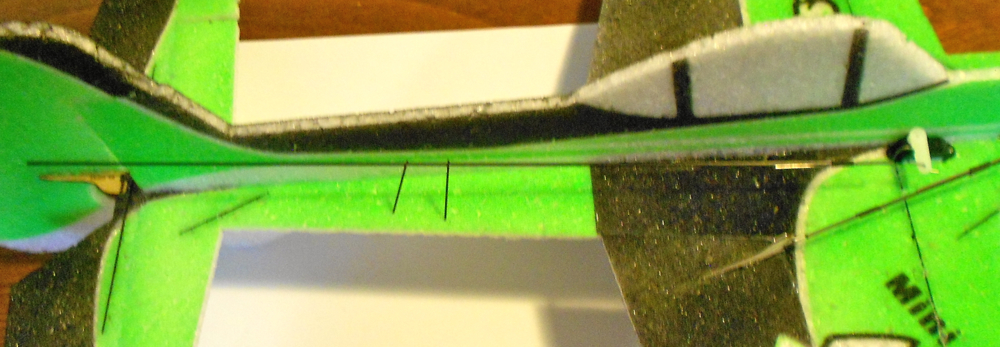
Optional: Using the short carbon fiber cutoff pieces from making the aileron pushrods, cut diagonal slots
in the foam between the rear fuselage and front of the stabilizer long enough to insert these pieces and glue them
in place using Foam-Tac glue. This helps prevent the stabilizer from skewing with full elevator deflection.
|

|
Put the elevator and rudder servos in the precut servo holes just in front of the wing spar. Glue the servos in
place. Foam-Tac can be used, some people prefer hot glue. You want them firmly attached.
|

|
When the tail pushrods are completed and installed, poke and glue (Foam-Tac) the standoffs into the foam at 1/3rd
distances from the ends. Adjust the depth of the standoffs to hold the pushrods as straight as possible from end
to end.
|

|
With your servos plugged into the Rx, center your servos as best you can, removing and centering the arms to the
closest spline. Adjust the final centering with the subtrim for each channel so you have perpendicular arms and
full trim available. Now use the servo arm screws and lock the arms in place on the servos.
|
Install the motor and propeller and position the ESC on the front of the plane. Position the receiver also.
|

|
The plane is now completely assembled. Route the servo wires through a slit in the foam to the receiver side of
the fuselage and connect the servos to the receiver and using Velcro, attach the receiver and ESC to the fuselage.
Put a long strip of Velcro on the opposite side below the wing spar in order be able to move the battery forward
and back to fine tune your balance. The Velcro will stick best to the EPP if you rub some contact glue on the area
you are attaching it to.
|
Use tie wraps to gather the wires in a neat bundle.
|

|
The CG of the plane is on the carbon wing spar to 1/4" behind it.
Control throws are a matter of personal preference. Some people want lots of surface movement to do 3D maneuvers
while other people like a more docile handling plane. The Yak responds very well to rudder movement and throws up
to 45 degrees in each direction are often used. You can add exponential to your controls to calm down the center
portion of the travel. If you are going to go for this type of aggressive throws, you might want to start with 50%
exponential until you get a feel for the plane. EPP is very durable and also easily repaired. Don't be afraid
to challenge yourself and learn new things. Get out and enjoy flying.
|